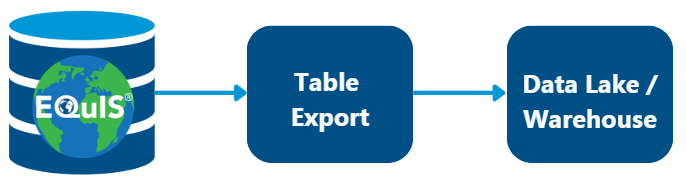
The Table Export feature is an expansion to the EQuIS REST API license that delivers scheduled exports of selected EQuIS tables to easy-to-consume files, which can integrate with data lakes, data warehouses, and other big data applications without manual pulls or direct database access. The Table Export process runs on a predictable schedule (e.g., daily, weekly, monthly) specified by the client. This process is owned and managed by EarthSoft, not the client.
Requirements and Licensing
•Only available to EarthSoft hosted clients
•Requires a REST API subscription
•Cost is per site/database and related to the quantity of records exported
•Up to daily export frequency (e.g., daily, weekly, monthly)
•Some data types not supported (BLOB, etc.)
Process
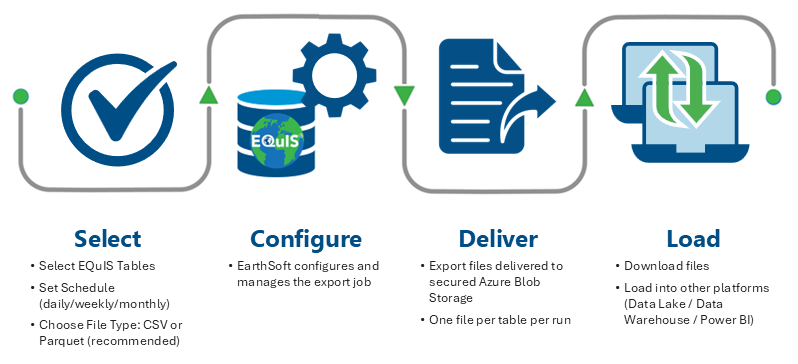
The client determines the following options:
•Tables – The exact EQuIS tables to be exported (e.g., DT_LOCATION, DT_SAMPLE, DT_TEST, DT_RESULT, RT_ANALYTE, etc.). Where applicable (e.g., DT_LOGGER_DATUM), the client may specify a time window of records to include (e.g., last X days).
•Frequency – The frequency at which the EQuIS tables will be exported (e.g., daily, weekly, monthly, etc.).
•File Type – The desired file type for the exported files. Options are comma-separated files (*.csv) or Parquet files (*.parquet).
Note: EarthSoft recommends Parquet files for the Table Export process. |
EarthSoft implements the export process based on the list of tables, desired frequency, and file type, and places the exported table files in a secured Azure Storage Blob container. EarthSoft provides the client secure access to the Blob container where they can download the exported files.
•Based on the client’s requirements, security options can include Entra ID managed identity, access keys, IP filtering, virtual networks, and/or private endpoints.
•Each EQuIS table is exported in its entirety (not a “delta” of new or modified records). Where applicable (e.g., DT_LOGGER_DATUM), the client may specify a time window of records to include (e.g., last X days).
•Each EQuIS table is exported to a separate file (e.g., DT_RESULT.parquet) and the file name stays the same for each recurring export. Thus, the latest export replaces the file in the Blob container.
•The process tracks the total number of records in the most recent export as the “table export” metric for the site/database (not cumulative over time).
•The client (i.e., via automated script in their environment) downloads the files directly from the Blob container and processes them as desired. Managing data permissions/confidentiality are the client’s responsibility after downloading the files.
The graphic below illustrates the Table Export process workflow for integration with data lakes, data warehouses, and other big data applications.
Contact EarthSoft Sales for more information or to activate this feature.